 KL Trains
Get across Kuala Lumpur by train.
Every line in the Klang Valley — Rapid KL, KTM Komuter and KLIA Transit. Compare every route side by side, see which platform to stand on, and use it all with no signal.

iPhone · iOS 18 or later · One-time purchase, no subscription.
See all the routes, not one
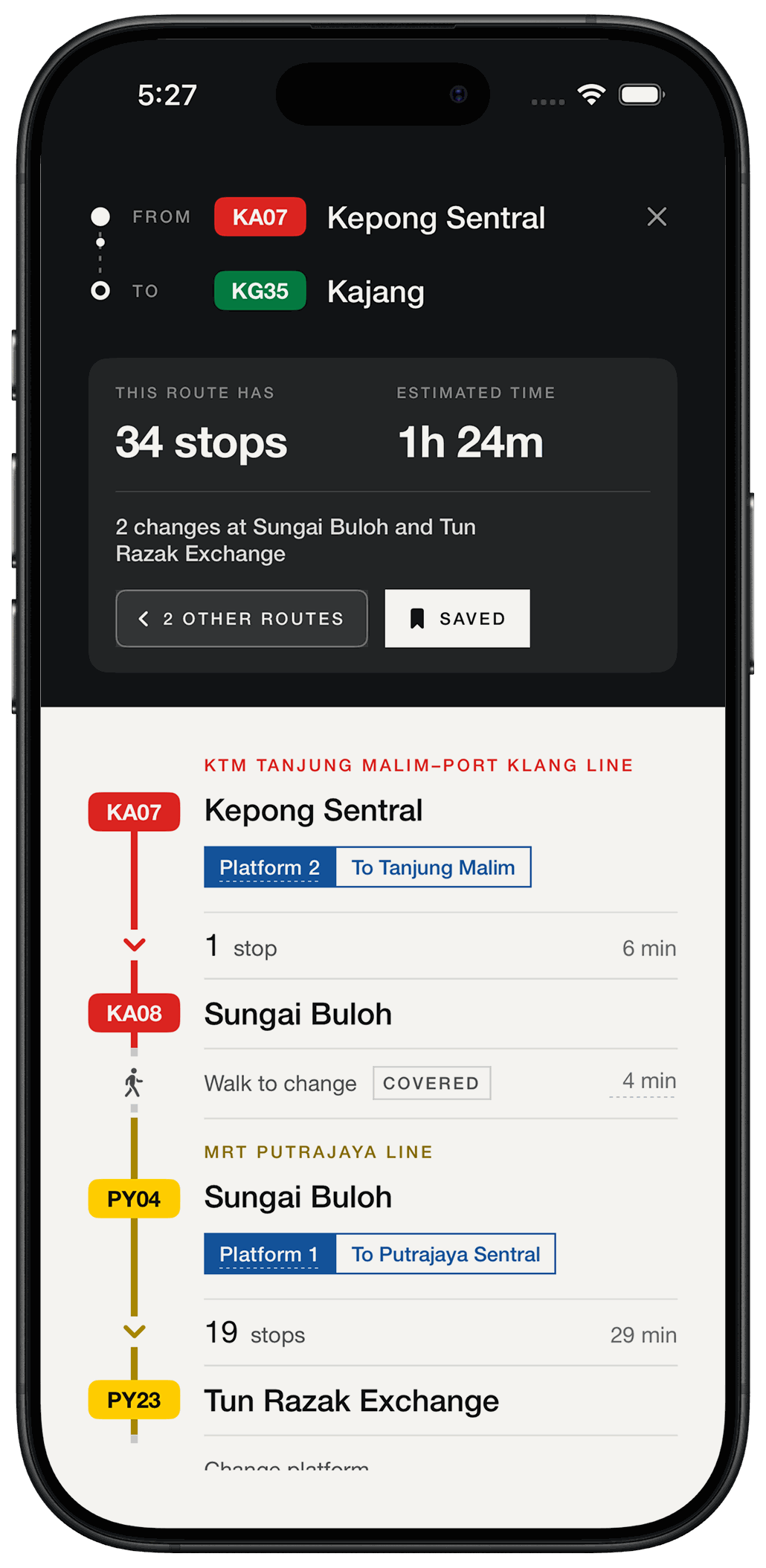
Most journeys across KL have more than one sensible answer, often across two operators. You get them together, on the same scale, and you choose.
Know your platform
Platform number and direction at every boarding and every change — the same pairing as the sign above your head.
Works underground
Every station and timetable is built into the app. No signal, no loading, no spinner four levels below Bukit Bintang.
Two stations in. A platform to stand on out.
Pick your two stations
Type either end. Sponsored names work too, so “Maybank” finds Merdeka and “Pavilion” finds Bukit Bintang.
Compare the routes
Stops, changes and time, drawn to one scale so you can see at a glance which is actually quicker.
Follow the journey
Station by station, with the platform and the direction at every boarding and every change.
Start it, and look down
Put the journey on your Lock Screen. The line, the platform and the stops left are there without unlocking anything — and in the Dynamic Island on iPhone 14 Pro and later.
The same journey, on the Lock Screen. Tap Stop when you arrive, or leave it — it clears itself.
The small things you notice on the third trip.
Real timings
Journey times come from the operators' own published timetables, not from an estimate of how far apart two stations look.
Waiting counts
A Komuter train every 40 minutes should not beat an LRT every 5. The ranking knows the difference.
No junk routes
Only the journeys worth taking. Close calls both stay, so you can pick the one that changes where you'd rather change.
Save the journey
Two routes between the same pair of stations are two different trips. Keep the one you actually take.
Built to be read
Large type, real contrast, full VoiceOver. Legible one-handed in a packed carriage.
On your Lock Screen
Start the journey and it waits where you can see it — which line, which platform, how many stops left. No unlocking, no digging around.
All ten lines. 240+ stations.
Every Rapid KL line, both KTM Komuter lines, and KLIA Transit to the airport. Each colour is the operator's own.
KL Trains is an independent app. It is not affiliated with, endorsed by or connected to Prasarana Malaysia Berhad, Rapid Rail, Rapid KL, MRT Corp, Keretapi Tanah Melayu Berhad or Express Rail Link. Line names, codes and colours belong to their operators and are used to identify real services, as a map does.
Frequently asked
Does it show live train times?
No. There is no reliable live feed for KL rail, so the app gives journey times and platforms and leaves departures to the boards on the concourse.
Does it need an internet connection?
Never. It works the same in a tunnel, on a plane, or with the phone in airplane mode.
Does it track my journey?
No. The app never asks for your location and never connects to anything, so it does not know where you are or whether you caught the train. The Lock Screen card is a standing note of the journey you chose: you start it, and it shows the same plan the app does.
You end it by tapping Stop or swiping the card away. Forget, and it clears itself shortly after the journey should have finished.
Which lines are covered?
All ten. Seven Rapid KL lines run by Prasarana and Rapid Rail — MRT Kajang and Putrajaya, LRT Kelana Jaya, Ampang, Sri Petaling and Shah Alam, and the KL Monorail. Both KTM Komuter lines run by Keretapi Tanah Melayu Berhad. And KLIA Transit, run by Express Rail Link, which puts both airport terminals on the map.
KLIA Ekspres is not included: it runs the same track as KLIA Transit but non-stop, so it adds no stations and no routes the app could offer. Neither is the KL Sentral–Terminal Skypark line, suspended since 2023.
How much does it cost?
A single up-front purchase — see the current price on the App Store. There are no in-app purchases, no subscription and no advertising, so that is the only thing you ever pay.
Is there an Android version?
Not yet. If you want one, say so at kl-trains@heimastudio.xyz.
Something looks wrong. What do I do?
Tell us. Email kl-trains@heimastudio.xyz with the station and what the sign actually says. A photo of the overhead sign is ideal.
Questions, or a station we've got wrong?
Email kl-trains@heimastudio.xyz, or start with Help & Support.